Schulz Consulting

Consulting and Upgrades

  • Home
  • Services
  • Technical
    • Sage 100 New Features ( Brief )
  • Sage 100 Support

Where Can I Download Sage 100 ERP (fka MAS90 or MAS200) version 2013?

December 14, 2012 by Wayne Schulz

Sage has just turned on their landing page for the new release of Sage 100 ERP 2013.

This release of Sage 100 ERP 2013 is available entirely by download. There are no disks sent by mail.  Luckily the process for downloading the 2.29 GB  file is very simple (see instructions below) and takes under an hour (depending upon your connection speed).

Once downloaded you will have a single self-extracting EXE file which when clicked creates a folder holding the entire installation disk (including Crystal Reports). Separate downloads are needed if you use Sage CRM or Sage Intelligence reporting.

Once downloaded you can install your upgrade (we strongly recommend consulting your Sage business partner first) from the source files on your server.

Schulz Consulting / DSD Business Systems customers should not worry about downloading the file as we’ve already secured copies and will transfer this file (as well as all other files needed to upgrade) onto your servers via the use of Dropbox which will synchronize the files overnight for you.

This update introduces several enhancements to Sage 100 ERP (fka MAS90 and MAS200)

  • Visual Process Flows – Menu “maps” make navigating the system easier than ever.
  • Sage Exchange integration for credit cards now allows for use of credit card swipers (Important: Talk to your partner about the conversion process as it may be more time consuming if you have many years of credit card history. Also please recall that PC Charge is no longer supported on Sage 100 ERP 2013).
  • Customers and vendors may now be designated as inactive.
  • Cleared checks from Bank Reconciliation now show up in Account Payable vendor maintenance.
  • Multiple ERP companies can access a single Sage CRM database.
  • Sage Advisor notifies you when it’s time to upgrade
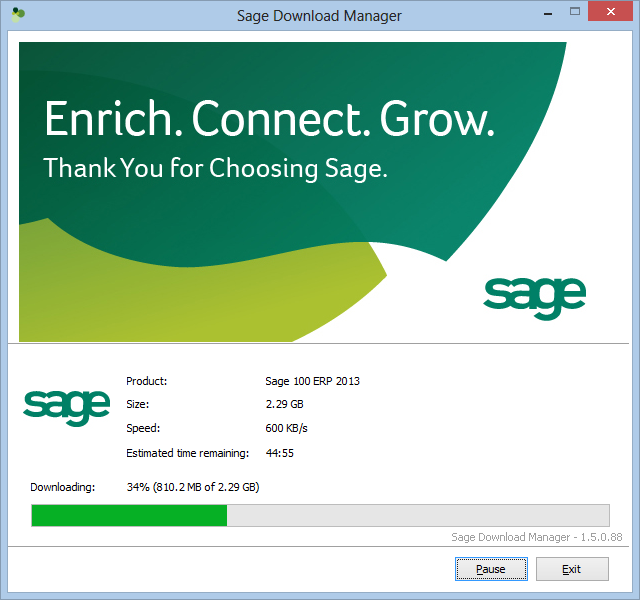
 

The Sage 100 ERP 2013 software may be downloaded from:

CUSTOMERS:

Sage 100 ERP customers on a Business Care plan can download your copy by logging on to the Customer Portal, and then clicking on www.Sage100ERP.com/download2013. Before you download, Sage recommends that you check with your certified solution provider to assist with your upgrade.


PARTNERS:

Sage 100 ERP certified Business Partners can download your copy by logging onto the Partner Portal, and then clicking on www.Sage100ERP.com/download2013.


Detailed Information On What’s New in Sage 100 ERP 2013  fka MAS90 MAS200

For a more in-depth description of new features in this release – please review either of  the PDF files

Sage 100 ERP – At-a-Glance Version Enhancements Version 2013 (PDF)

Sage 100 ERP 2013 Detailed Release Guide (PDF)


Need help understanding your upgrade options? Contact Us.

Filed Under: Sage 100 ERP Tagged With: download, mas200, Sage 100 ERP, sage 100 erp 2013, sage crm, sage exchange, sage intelligence, upgrade

How to export the Sage 100 (fka MAS90) company code (sy_company) using Visual Integrator

December 9, 2012 by Wayne Schulz

Here’s a very interesting two step process to perform a task which at first seems impossible. A member of the Sage 100 ERP Linkedin Group asked:


Anyone know how to link SY_Company into VI Export so I can get the Company Code in an Export from AP?


The answer is a relatively easy change that you must make to Visual Integrator which includes adding a temp calculated field and then assigning that value to an unused standard Sage 100 field.

Apparently this is needed because Sage Visual Integrator won’t export temporary fields.


Read the entire solution here.

Filed Under: Sage 100 ERP Tagged With: linkedin group, mas200, Sage 100 ERP, visual integrator

Federal Medical Device Excise Tax (MDET) for Sage 100 ERP (fka MAS90 and MAS200)

December 9, 2012 by Wayne Schulz

The Patient Protection and Affordable Care Act imposes an excise tax of 2.3 percent on the sale of certain medical devices. Recently the IRS issued TD 9604  (here) which spell out more of the guidelines for the MDET.

Deal or No Deal, Obamacare Taxes Poised To Hit Next Month

We recommend that you consult with a tax professional on how (or if) this new regulation may apply to your company.

Some users of Sage 100 ERP (formerly known as MAS90 or MAS200) have asked how to best change their software to account to capture any required excise tax.

One solution which is on the horizon is from Avalara who is a provider of integrated sales tax computation and reporting services. Their solution integrates to Sage 100 ERP and computes taxes during the order entry and invoicing process. They also offer tax reporting and filing services to help make the process manageable.

Avalara reports:
We want to update you on the next release of AvaTax Calc, which includes changes to the AvaTax WSDL (Web Services Definition Language), enhancements to the user interface and support of the new Federal Medical Device Excise Tax. The AvaTax Calc SDK-DEV environment will be updated on December 12, 2012 from 5:00-9:00pm and to the production environment on December 27, 2012 from 5:00-9:00pm. These enhancements will not affect your product usage or ability to access AvaTax Calc.

Medical Device Excise Tax

We have updated AvaTax Calc to support the Federal Medical Device Excise Tax (MDET) going into effect as part of the Health Care and Education Reconciliation Act of 2010 in January 2013. In support of this, AvaTax Calc will allow you to calculate medical device excise taxes and generate a report to file the appropriate federal IRS tax forms.
We are introducing a new report and two new Entity Use Codes. The Entity Use Codes, used in combination with a Tax Code, will support the proper tax calculation.

Federal excise tax summary report

MED1 – calculates excise tax only (exempt sales and seller’s use tax)
MED2 – calculates excise tax in addition to sales and seller’s use tax (taxable sales and seller’s use)


Avalara – Avatax

Filed Under: Sage 100 ERP Tagged With: avalara, avatax, Excise tax, mas200, MDET, sage 100, Sage 100 ERP

Year End Closing Tips for Sage 100 ERP (formerly MAS 90) – Special Newsletter

December 6, 2012 by Wayne Schulz

Our special year end newsletter for Sage 100 ERP (formerly known as MAS90 or MAS200) users is now available. In this issue we explore tips and tricks for closing every module – including the order in which they should be closed.

Are you following best practices by creating year-end archive companies? If not – we will show you how to use the built-in features that allow Sage 100 ERP to quickly create backup copies of your live data. These copies of data are especially helpful for anyone using the payroll module since you can refer back to the archived companies throughout the year as your employees request copies of W2 and other forms which they may have lost.

This issue also has information on the payroll tax updates and provides information about when and how to apply them to your system to meet new IRS and state tax guidelines.

Sage 100 ERP Year In Review – 2012 Closing Tips (PDF)

Filed Under: mas200, Sage 100 ERP, Sage 100 ERP Premium, Sage software Tagged With: Closing, faq, mas200, Sage 100 ERP, tips, year end

Sage 100 ERP (formerly Sage ERP MAS 90 or MAS 200) Payroll 2012 Year End FAQ

December 5, 2012 by Wayne Schulz

Sage have just released their annual frequently asked questions for year end payroll processing. This document provides links to the needed tax tables as well as IRD (interim release disks) which may be needed prior to running payroll for the last time on Sage 100 ERP.

There is also a handy list of every Payroll Extended Solution which needs to be updated after loading the 2012 IRD for Sage 100 ERP (formerly Sage ERP MAS 90 or MAS 200).

Tax Table Update, Payroll, Electronic Reporting, and Accounts Payable

2012 Year-End Frequently Asked Questions
December 17, 2012

IRD (Interim Release Download): Interim Release Download contains the Year End program changes for Payroll,
Accounts Payable and Electronic Reporting modules. It also contains necessary program changes for eFiling and
Reporting.

TTU (Tax Table Update): Tax Table Update contains changes to applicable Federal and State withholding tax tables and
wage limits, State Disability percentages and/or limits and State unemployment limits.

1. Do I need to download the 2012 IRD for AP 1099 Reporting?

Yes, customers running Accounts Payable must install the 2012 year-end IRD. There are AP 1099 form changes included
in 2012 IRD. The following are the minimum versions. If you are not at least on the minimum version, you must add the
required product update to get to the minimum before installing the year-end IRD.
• 4.40.0.1: must have last year’s (2011) year-end IRD installed or PU 8
• 4.50.0
• 4.50.0 SQL
Note: The 2012 IRD is included in versions 4.50 PU5 and 2013 PU1

2. Do I need to download the 2012 IRD for Payroll W-2 reporting?
Yes, even though there are no W-2 form changes in the 2012 IRD, you must install the 2012 IRD in order to use eFiling
and Reporting, also to install the necessary program changes required when 2013-Q1 TTU is installed. The following list
contains the minimum versions required. If you are not at least on the minimum version, you must add the required
product update to get to the minimum before installing the 2012 IRD.
• 4.30.0.18: must have last year’s (2011) year-end IRD installed
• 4.40.0.1: must have last year’s (2011) year-end IRD installed or PU 8
• 4.50.0
• 2013: or install PU 1
Note: The 2012 IRD is included in versions 4.50 PU5 and 2013 PU1, which are scheduled to be released around
December 10
th
. Customers running version 4.50 can install either the 2012 IRD or PU5 but are not required to install both.
Customers running version 2013 can install either the 2012 IRD or PU1 but not required to install both.
 

Download 2012 Sage 100 ERP Payroll FAQ (pdf)


Filed Under: Sage 100 ERP Tagged With: 1099, ird, irs, mas200, payroll, sage 100, Sage 100 ERP, taxes, w2, year end

  • « Previous Page
  • 1
  • …
  • 4
  • 5
  • 6
  • 7
  • 8
  • …
  • 75
  • Next Page »

Sage 100 Newsletter

Search Our Site

Sage 100 News

  • How to Fix: Sage 100 Desktop Launcher Closes Immediately After Login (No Error)
  • How To Update Sage Intelligence Keys as Sage Moves Away From Unlimited Licenses
  • Get More From Your Sage 100 Partnership
  • Sage Future 2025 Preliminary Agenda Released
  • Upgrading Sage 100 to 64-bit: Avoid These Integration Pitfalls
  • What’s New in Sage 100 2024? ( Video )
  • Sage 100 Users: Conquer Minnesota’s New Sales Tax & Delivery Fee Headache-Free
  • Elevate Your Sage 100 Expertise with SchulzSays: The Ultimate Newsletter for Users and Consultants
  • How To Purge Cleared Bank Reconciliation Transactions in Sage 100
  • 10 Exciting New Features in Sage 100 2024

Contact Us

Schulz Consulting · Connecticut Office · Available remotely nationwide.

Contact Schulz ConsultingPhone: 860-657-8544Email Us

We are a local branch of DSD Business Systems Connecticut.

Copyright © 2026 · Parallax Pro Theme on Genesis Framework · WordPress · Log in

Loading Comments...

You must be logged in to post a comment.