Schulz Consulting

Consulting and Upgrades

  • Home
  • Services
  • Technical
    • Sage 100 New Features ( Brief )
  • Sage 100 Support

MAS 500 7.3 Gets Native Avalara Sales Tax Processing Code – Eases Upgrade Process

March 23, 2010 by Wayne Schulz

sage mas500 avalara.jpg

Avalara announced yesterday that their Sales Tax for MAS 500 (aka Sage Sales Tax) now has the code embedded into the MAS 500 version 7.3 release.

Sales tax processing embedded in MAS 500 allows for the user to receive accurate tax computations on each order that’s processed through the system. The monthly or quarterly sales tax returns can also be processed for any state – with resulting forms transmitted to the appropriate state.

Sales tax processing is the type of procedure that most companies take for granted — until challenged on an audit. With states increasingly under pressure to raise revenues it’s increasingly likely that more audit resources will be deployed to verify that companies are charging and collecting proper amounts of sales tax.

According to Sage,

Sage MAS 500 and Sage Sales Tax developers worked together and added code (hooks) specifically for Sage Sales Tax in the base MAS 500 code for 7.3. This was done so users who installed Sage Sales Tax for MAS 500 7.3 would not have to obtain updates from Avalara each time MAS 500 released a Monthly Update.

Avalara (www.avalara.com), the leading provider of Web-based sales tax automation and compliance solutions, announced today that Sage Sales Tax, Powered by AvaTax™, is now embedded within the code base of Sage MAS 500, beginning with version 7.3. Sage’s award winning research and development team led the integration effort to address significant customer demand and to enhance customer experience.

“This is a major endorsement from one of the industry’s most highly regarded providers of ERP and other business applications”

“Sage Sales Tax, Powered by AvaTax, is a great example of how Sage is executing on our strategy to deliver hosted services that make the most sense for our customers,” said Alan Bryant, Sage senior vice president. “Integrating key hosted, SaaS, and other cloud-based service offerings into Sage’s on-premise business applications gives our customers the best of both worlds.”

via: Avalara Press Release

Filed Under: Sage 500 ERP Tagged With: avalara, sage mas500, sales tax

Fitzgerald Group advises Massachusetts MAS90 users of August 1 sales tax changes

July 30, 2009 by Wayne Schulz

the fitzgerald group.jpg

Massachusetts Sales Tax Changes Take Affect August 1, 2009

Mike Fitzgerald of The Fitzgerald Group just sent me this information about an upcoming change in Massachusetts sales tax. According to his notice the state is increasing the sales tax rate effective August 1, 2009.

Please consult with your tax advisor prior to making any changes.

Here are the instructions for those Massachusetts MAS 90 or MAS 200 users who need to update their sales tax rates for the upcoming changes.

Massachusetts sales tax is changing from 5% to 6.25% effective August 1, 2009. If you collect sales tax on Massachusetts sales (and do not use an add-on sales tax program) you must manually change the sales tax rate before starting August invoicing.

Follow these steps in order to update the MAS90 or MAS200 sales tax rate:

Before you begin:

* You’ll want to change the sales tax rate after all July invoicing is complete, and before printing August invoices.
* Make sure there are no users entering invoices or sales orders while you perform these steps.

Change the rate in the sales tax table:

* In Library Master/Setup/Sales Tax Code Maintenance, select your Massachusetts tax code.
* On the taxable line in the table, change the rate from 5.00 percent to 6.25 percent.
* Click Accept.

Update your in-process sales orders and/or invoices:

* In Accounts Receivable/Utilities, select Sales Tax Calculation.
* Make sure all the boxes are checked, and select “recalculate sales tax for all records.”
* Click Proceed.

If you track sales taxes in Accounts Payable/Purchase Order:

* In Accounts Payable/Utilities, select Sales Tax Calculation.
* Make sure all the boxes are checked, and select “recalculate sales tax for all records.”
* Click Proceed.

More information – The Fitzgerald Group – Sharon MA

Filed Under: Consultants, Sage 100 ERP, Tips and Tricks Tagged With: massachusetts, sales tax, The Fitzgerald Group, Wayne Schulz

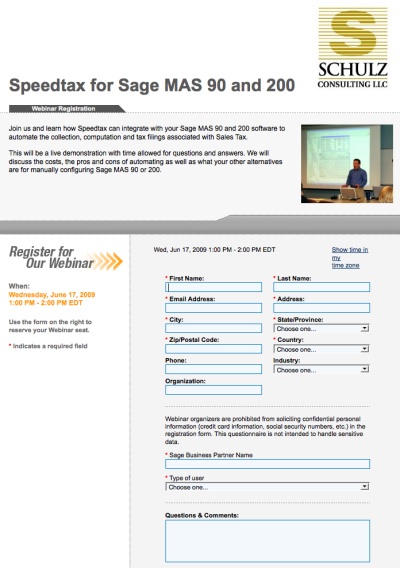
MAS90 Sales Tax Compliance Demo – Today June 17 1pm EST

June 17, 2009 by Wayne Schulz

speedtax compliance mas90.jpg

I think in the coming years we will see significant compliance audits by the Government (State and Federal) looking to recover every bit of tax money they can.

Update: Read this WSJ article 6 States Hitting Residents With Big Tax Hikes

If your company is collecting sales tax for multiple states or if your monthly sales tax liability is significant – and you’re not already using a service to help prepare your sale tax returns and calculate the proper tax on every transaction – why?

One common mis-conception about sales tax is that if a company is audited for sales tax they will just re-bill their customer for any tax mistakes.

Wrong

Hardly every happens.

And if it does (provided tax law allows for re-billing the tax) – good luck collecting from your good customers.

Even better luck collecting from the deadbeats…

The only way I’ve seen clients “beat” the Government out of a sales tax audit is to have books and records that are in tip top shape.

If you’re collecting sales tax for several states it’s virtually impossible to keep up-to-date on sales tax rate changes in ever region (and many states have several overlapping jurisdictions that have different tax rates).

So how do MAS 90 and MAS 200 users manage the burden of sales tax compliance?

We’re going to talk about one solution today at 1pm.

It involves integration MAS 90 or MAS 200 with Speedtax which takes your shipping data and automatically computes the proper sales tax. The service also prepares the sales tax filings for you.

Quite honestly a lot of my customers only use these services AFTER an expensive tax audit convinces them of the need to pay attention to the details of collecting tax.

Stay ahead of the game (or at least be better informed of your options).

Register for this Wednesday (today) June 17 1pm EST seminar on

Sales Tax Compliance for MAS 90 and MAS 200 with Speedtax

sales tax mas90.jpg

Filed Under: Add Ons, Sage 100 ERP Tagged With: Sage 100 ERP, sales tax, speedtax, Wayne Schulz

Avalara explains January 21 slowdowns and data outage

January 23, 2009 by Wayne Schulz

Several of my Sage MAS 90 reseller friends were contacted by their clients who subscribe to  Avalara’s sales tax processing and reporting service. These clients noticed on January 21, 2008 that  their Avalara Sales Tax processing add-on for Sage MAS 90 and 200 was either not connecting or very slow in reaching the Internet to obtain and updated sales tax processing information.

Avalara is an outsourced Sales Tax processor who have a link for the Sage MAS 90 and MAS 200 accounting system. As you process sales orders the program reaches out over the Internet to the Avalara servers to compute the exact tax based on shipping location and other appropriate tax rules.

One Sage VAR described the January 21, 2009 outage as “six hours” while another reported only varying lengths of time and their connection problems were only described as “slow”.

According to an email just shared, Avalara has this explanation:

Yesterday Avalara’s Avatax system suffered a disruption caused by an unexpected error during a routine maintenance activity.  This error impacted multiple systems and required intensive effort to restore all functionality. During this time, customers experienced varying levels of disruption, from complete outage to slow response times. Detailed analysis has resulted in the establishment of several new processes and procedures designed to eliminate the possibility of a recurrence of this or similar issues. In addition, Avalara is in the process of implementing a significant hardware upgrade that will dramatically improve the reliability and performance or our system.  Additional reliability related improvements are planned for release during the first half of 2009. We apologize for the inconvenience and seek to assure you and all customers that we are committed to constantly improving the dependability of our technology and service.

Generally acknowledged as a good sales tax service, the Avalara weakness seems to be both the reliance on a remote Internet site to calculate sales tax and return the proper amounts (when the site is down so is your tax calculation) as well as some speed issues with calculating tax on large sales orders.

The workaround for times when the tax service may be unavailable (and we haven’t heard of any other widespread outages like this) is to change the tax code from the Avalara provided code to another. Then when service returns, swap the code back to Avalara and re-calculate the tax. This provides a mini-workaround that would unfortunately result in a delayed posting of invoices until the tax could be re-computed.

Resellers who work with Avalara on a daily basis report that new software connectors supplied by the company appear to resolve some of the slow speed and connectivity issues.

Filed Under: Sage 100 ERP Tagged With: avalara, avatax, mas200, Sage 100 ERP, sales tax, Wayne Schulz

  • « Previous Page
  • 1
  • 2
  • 3

Sage 100 Newsletter

Search Our Site

Sage 100 News

  • How to Fix: Sage 100 Desktop Launcher Closes Immediately After Login (No Error)
  • How To Update Sage Intelligence Keys as Sage Moves Away From Unlimited Licenses
  • Get More From Your Sage 100 Partnership
  • Sage Future 2025 Preliminary Agenda Released
  • Upgrading Sage 100 to 64-bit: Avoid These Integration Pitfalls
  • What’s New in Sage 100 2024? ( Video )
  • Sage 100 Users: Conquer Minnesota’s New Sales Tax & Delivery Fee Headache-Free
  • Elevate Your Sage 100 Expertise with SchulzSays: The Ultimate Newsletter for Users and Consultants
  • How To Purge Cleared Bank Reconciliation Transactions in Sage 100
  • 10 Exciting New Features in Sage 100 2024

Contact Us

Schulz Consulting · Connecticut Office · Available remotely nationwide.

Contact Schulz ConsultingPhone: 860-657-8544Email Us

We are a local branch of DSD Business Systems Connecticut.

Copyright © 2026 · Parallax Pro Theme on Genesis Framework · WordPress · Log in

Loading Comments...

You must be logged in to post a comment.