Schulz Consulting

Consulting and Upgrades

  • Home
  • Services
  • Technical
    • Sage 100 New Features ( Brief )
  • Sage 100 Support

Sage 100 Paperless with Gmail and Less Secure Apps

November 17, 2020 by Wayne Schulz

We just ran across an instance where a customer using Sage 100 2020.x and paperless office for electronic delivery of statements was suddenly having their Google Workspace ( aka G-Suite or Gmail ) email account login and password rejected.

It’s important to note that this customer was NOT using two-factor authentication with Google. If they were to use two-factor this issue likely would have been resolved by using an app-specific password ( only available to those with two-factor enabled).

Just one month ago we thought we’d resolved this issue by enabling less secure applications within their Google email.

Google has begun tightening their security protocols for what they term less secure apps. Essentially these are apps which require you to enter in your Google credentials as opposed to using a more secure authentication which might grant access to only a portion of your Google account such as only email or only calendar access.

You can read more about Google’s less secure apps policy here.

It appears that while you can enable access for less secure apps, Google will periodically disable that access should the app not login for an undefined period of time.

This is apparently what was happening as our customer only printed statements every 30 days.

The resolution to the rejected login from within Sage 100 paperless office was to once again enable less secure apps from the Google account.

Filed Under: Sage 100 ERP Tagged With: email, g-suite, gmail, google, less secure, paperless

Why I use, love and adore Gmail

July 3, 2009 by Wayne Schulz

People look at me funny when I tell them that our entire office runs off Google Apps for Domain. That means we don’t have any Microsoft Office deployed on local workstations. All of our documents and spreadsheets are prepared in Google Docs which means we have no software to load or configure on local workstations in the office.

It also means that when we’re out of the office we can access our documents from ANY Internet connected computer.

We also use GMAIL for all of our email. It’s much less hassle to maintain than a separate Exchange Server (which we’ve done in the past and found to be a huge waste of time and resources for very little benefit).

This morning I received an autoresponder email from one of our email subscribers who is apparently without access to any email for several days due to an internal server problem…. And I am again reminded of exactly why I love GMAIL. It’s the lack of these types of problems that keep me convinced that outsourcing email is the wisest move we’ve ever made.

gmail.jpg

Filed Under: schulz consulting, Technology Tagged With: gmail, Wayne Schulz

Speed up Gmail on iPhone – [how to]

April 6, 2009 by Wayne Schulz

Ever since purchasing my first generation iPhone I’ve had a problem with the speed at which it retrieved Gmail. Sporadically (actually most of the time) my Gmail retrieval would hang for long periods of time – or not retrieve at all.

I tried emptying my inbox. Sometimes that worked. More often than not it did not.

Just today I stumbled across the solution that significantly sped up my iPhone 3G’s Gmail retrieval times. I believe this will also work on the first generation iPhone as well as iPod Touch models.

The trick is to turn on the Google Labs advanced iMap support.

google labs.jpg

Once you’ve enabled the option in Google Gmail Labs, you then can turn off the synchronization of folders via iMap. This seems to significantly speed the retrieval of email. My iPhone went from lengthy two or three minute retrieval lags to virtually no lag at all!

google imap.jpg
GMAIL Folders.jpg

My iPhone has never been faster and the annoying lags are completely gone!

Filed Under: Technology Tagged With: apple, ct, gmail, google labs, imap, iphone, ipod touch, Wayne Schulz

Anagram now works in BlackBerry and GMail to copy contact details from email

April 2, 2009 by Wayne Schulz

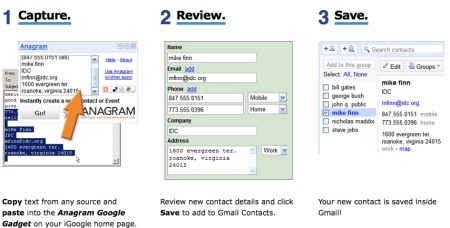
We just got word that Anagram is now available for both GMail and BlackBerry. This handy little utility is used to read in a signature line from your email and strip out the relevant contact information such as: company name, contact, phone, etc. Then that data is displayed for editing and finally placed into your contact file.

anagram blackberry.jpg

I’ve used this previously within Microsoft Outlook and absolutely loved it. Most email software packages allow for saving contact email addresses but they don’t scoop up the important stuff like the name, address and phone number. With Anagram you simply swipe over the contact information, select “Copy to Anagram” (or within iGoogle past the information to the widget).

anagram gmail google.jpg

After editing the info (if needed) you upload to your contacts. Brilliant. Recommended. And did I mention it’s free for Google and Blackberry (only $35 for Outlook)?

anagram google.jpg

Anagram via trhall twitter

Filed Under: Technology Tagged With: anagram, blackberry, gmail

Sage 100 Newsletter

Search Our Site

Sage 100 News

  • How to Fix: Sage 100 Desktop Launcher Closes Immediately After Login (No Error)
  • How To Update Sage Intelligence Keys as Sage Moves Away From Unlimited Licenses
  • Get More From Your Sage 100 Partnership
  • Sage Future 2025 Preliminary Agenda Released
  • Upgrading Sage 100 to 64-bit: Avoid These Integration Pitfalls
  • What’s New in Sage 100 2024? ( Video )
  • Sage 100 Users: Conquer Minnesota’s New Sales Tax & Delivery Fee Headache-Free
  • Elevate Your Sage 100 Expertise with SchulzSays: The Ultimate Newsletter for Users and Consultants
  • How To Purge Cleared Bank Reconciliation Transactions in Sage 100
  • 10 Exciting New Features in Sage 100 2024

Contact Us

Schulz Consulting
Connecticut Office
Click Here To Contact Schulz Consulting
Phone: 860-657-8544
Email Us
Available remotely nationwide.
We are a local branch of DSD Business Systems Connecticut.

Copyright © 2026 · Parallax Pro Theme on Genesis Framework · WordPress · Log in

Loading Comments...

You must be logged in to post a comment.