Schulz Consulting

Consulting and Upgrades

  • Home
  • Services
  • Technical
    • Sage 100 New Features ( Brief )
  • Sage 100 Support

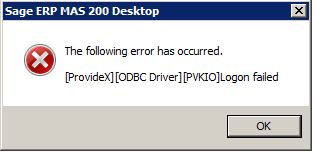
[Providex][ODBC Driver][PVKIO] Logon Failed When Accessing BIE in MAS 200 4.5 PU3

April 17, 2012 by Wayne Schulz

Here’s a pesky issue that my 90 Minds colleague Mark Kotyla just resolved after many hours of head scratching by our group and by tech support.

[Providex][ODBC Driver][PVKIO] Logon Failed.

This error displays when accessing any BIE in MAS 200 4.5 PU3 (either on server or TS session). I’ve seen threads on this topic for Crystal Reports, but all reports print fine. Only BIE is affected.


Several suggestions from our group suggested:

  • Re-run workstation setup
  • Pay attention to system security


None of the conventional suggestions worked. Mark opened a case with Sage.

Ultimately his resolution was:

After several hours of trying this and that, I noticed that MAS was launching in XP Compatibility mode. Once disabled, error went away. MAS 200 4.3 on same server (2008 R2) works fine in compatibility mode. Appears that only 4.5 (all PU’s) has this issue.


via: Mark Kotyla Giving Tree Consulting

Filed Under: Sage 100 ERP Tagged With: bie, compatibility, mas200, pvkio, Sage 100 ERP, terminal server

How To Install Sage MAS 90 Paperless Office On Terminal Server and eliminate “unable to process lockfile” and “unable to initialize PDF viewer” errors

July 1, 2009 by Wayne Schulz

mas90 paperless office.jpg

If you are setting up MAS 90 or MAS 200 under Terminal Server/Citrix and attempting to use Paperless Office for your forms/reports you may receive one of the following errors:

1. Unable to process lockfile
2. Unable to initialize PDF Viewer

UPDATE OCTOBER 2011: See this “Best article on solving Sage ERP MAS90 paperless office printing problems” which contains an updated and more complete list of resolutions for the typical  problems encountered while using paperless office within MAS90 or MAS200.

While there may be other resolutions (One possible cure for which is described in the Schulz Consulting Knowledgebase and involves registry entry changes which you should be extremely careful with), we’ve seen the following steps work to eliminate both of the above error conditions:

Unable to initialize PDF Viewer by selecting “run as administrator” for the MAS200 installation. It appears that this only must be done once and that after the initial time of starting the MAS 200 workstation that the proper DLL (we think cdintf.dll) is then registered.

In order to overcome the “unable to process lockfile” try temporarily adding the user to the “power users” group on the Terminal Server. Re-run the setup of paperless office (this is in Company Maintenance – Email – Advanced).

It appears that both issues are user rights related.

Once the above is done you may be able to successfully test the PDF viewer with no errors.

Filed Under: Knowledgebase, Sage 100 ERP, Tips and Tricks Tagged With: citrix, paperless office, terminal server, Wayne Schulz

Sage 100 Newsletter

Search Our Site

Sage 100 News

  • How to Fix: Sage 100 Desktop Launcher Closes Immediately After Login (No Error)
  • How To Update Sage Intelligence Keys as Sage Moves Away From Unlimited Licenses
  • Get More From Your Sage 100 Partnership
  • Sage Future 2025 Preliminary Agenda Released
  • Upgrading Sage 100 to 64-bit: Avoid These Integration Pitfalls
  • What’s New in Sage 100 2024? ( Video )
  • Sage 100 Users: Conquer Minnesota’s New Sales Tax & Delivery Fee Headache-Free
  • Elevate Your Sage 100 Expertise with SchulzSays: The Ultimate Newsletter for Users and Consultants
  • How To Purge Cleared Bank Reconciliation Transactions in Sage 100
  • 10 Exciting New Features in Sage 100 2024

Contact Us

Schulz Consulting · Connecticut Office · Available remotely nationwide.

Contact Schulz ConsultingPhone: 860-657-8544Email Us

We are a local branch of DSD Business Systems Connecticut.

Copyright © 2026 · Parallax Pro Theme on Genesis Framework · WordPress · Log in

Loading Comments...

You must be logged in to post a comment.