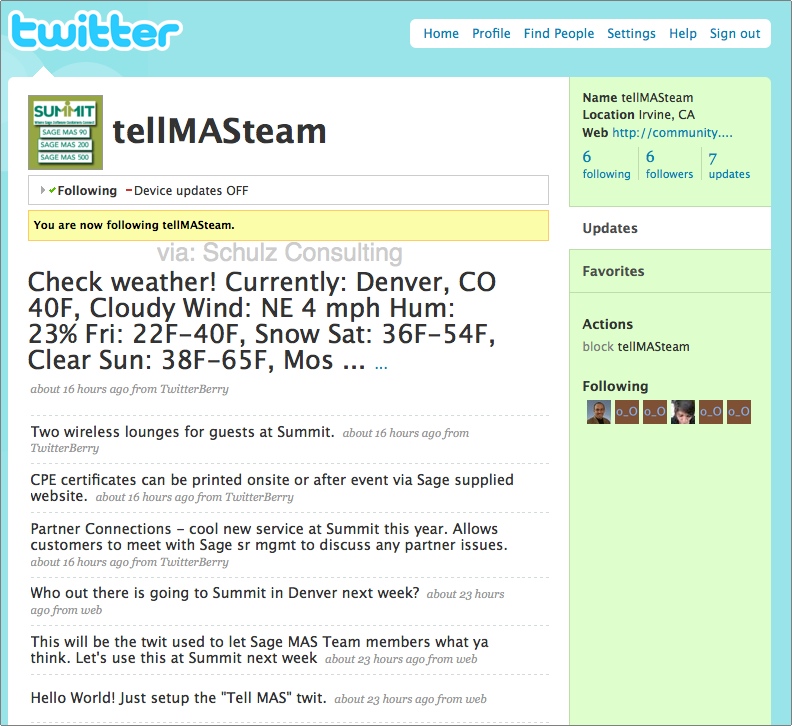
 Sage Software just established a Twitter account to collect feedback from those attending their Sage Summit Customer Conference being held November 17-20 in Denver.
Update November 9, 2009: Please see our Sage Twitter List here which contains the most up-to-date list of all Sage Twitter feeds.
By creating a free account on Twitter you can send messages directly to Sage with comments on sessions you’ve attended, inquiries about events that are happening during the conference – or just about anything else.
It appears that Mike Morper will be quarterbacking this even based on the forum posting he originated announcing the Twitter account.
The use of Twitter during Sage Software conference isn’t brand new. We think it’s a great idea and liked it so much that we were the first to use it at the Sage Insights Conference in Washington DC (read the entire twitter stream here) where we posted over 270 updates on sessions and newsworthy items such as the real time announcement of Sage Extended Enterprise for MAS90.
According to a posting in the Sage Software Customer Forum,
It’s important to us that you get as much out of the week at Summit as possible. To that end, we have setup a Twitter feed (www.twitter.com/tellMASteam) so you can provide us real-time thoughts and comments. If you’re confused about something (mixed messages, incomplete info… you name it) or just wanna say you’re having a great time and learning tons, send a post to this Twitter feed and if appropriate, me or one of my Sage MAS colleagues will respond and do our best to steer you (or us!) straight.
As the size of conferences expand, the ability to directly ask questions to the conference host (and other attendees) is a huge benefit.
Never Used Twitter Before?
So you say that you’ve never used Twitter before and aren’t sure what it is? (Check out my Twitter stream here for an example of the types of things people talk about)
Twitter is a way for you to broadcast short (140 character) messages or inquiries. Think of it as an Instant Messenger only instead of talking directly to one person your message goes out to everyone with a Twitter account.
Twitter is a service for friends, family, and co–workers to communicate and stay connected through the exchange of quick, frequent answers to one simple question: What are you doing?
In order to use Twitter you will need one of these things: an internet connection or a mobile phone.
Following someone (such as Sage Software) simply means receiving their Twitter updates. How you receive the updates (on your phone, IM, or just on the web) is up to you. You can set your following preferences based on device, and then set notification preferences for each person you follow. Your followers are those who have elected to receive your twitters.
These messages can be read on:
- The web – at http://www.twitter.com
- BlackBerry – I recommend Twitterberry
- iPhone – I use and love Twittelator Pro
- Other mobile web browsers – m.twitter.com
- Text messaging (read how here)
Because Twitter is a relatively new concept to most corporations – they tend to pay very close attention to the tool in an effort to evaluate its effectiveness.
If you are attending the Summit Conference – create an account and connect with Sage Software with your questions. This is one of the best ways to get personal attention to your very public feedback.
Links:
You must be logged in to post a comment.